If you’ve searched “types of schema markup,” you’ve probably landed on a list of 20-something items and closed the tab more confused than when you opened it. Most of those types don’t apply to your site at all.
This guide is different. It covers the schema types that actually show up on real websites, grouped by what they’re for, so you can find yours in under a minute. Then it covers something most schema guides skip entirely: how to connect your schema into one consistent structure instead of a pile of disconnected code blocks.
Quick summary: What to actually know:
- Schema.org lists 797 types and 1,453 properties, but most sites only ever need 10 to 15 of them.
- Schema isn’t a direct Google ranking factor, but it drives rich results, which drive clicks, which do affect rankings indirectly.
- The types you pick should match what’s actually visible on the page, nothing hidden or invented.
- A solid schema setup connects an Organization and a WebPage entity as a foundation, then layers page-specific types on top.
What Is Schema Markup?
Schema markup is structured code you add to a page that tells search engines exactly what the content is, not just what it says. Instead of Google guessing that a page is “probably about a recipe” from the text, schema states it directly: this is a Recipe, here’s the cook time, here are the ingredients.
It’s written using a shared vocabulary from schema.org, a project Google, Microsoft, Yahoo, and Yandex jointly started in 2011 to standardize how structured data works across the web. The most common format today is JSON-LD, a small script tag that sits in your page’s code without changing anything visitors actually see.
When it works, schema is why some search results show star ratings, prices, event dates, or FAQ dropdowns instead of a plain blue link.
Does Schema Markup Actually Help Rankings?
Not directly, and it’s worth being upfront about that. Google has said structured data isn’t a ranking factor on its own.
What it does do is make your result more likely to earn a rich snippet, and rich snippets get more clicks. Higher click-through rates are one of the signals that can indirectly support your rankings over time. Schema also gives search engines and AI tools a clearer, more literal read of your content, which matters more now that AI Overviews and other answer engines are pulling directly from structured, well-labeled pages.
So think of schema as removing friction rather than adding rocket fuel. It doesn’t force a ranking boost, but it clears the path for the clicks and citations that do.
How Many Types of Schema Are There?
Schema.org currently defines 797 types and 1,453 properties. That number is real, but it’s also misleading if you take it at face value, because most of those types exist for extremely narrow use cases you’ll never touch.
In practice, a normal business website needs somewhere between 10 and 15 schema types, covering things like your organization, your pages, your content, and whatever you sell or offer. The rest of the catalog is there for edge cases: specific vehicle listings, music discographies, scientific datasets, and so on.
The Main Types of Schema Markup
Here’s every schema type that actually shows up on most websites, grouped by what they’re for.
Business & Identity Schema
Organization Schema:
Establishes who’s behind the site: name, logo, official URL, and links to social profiles. This is the schema Google needs to build a Knowledge Panel for your brand. Build Organization Schema with the free Schema Markup Generator.
LocalBusiness Schema:
A more specific version of Organization for a physical location: address, hours, phone number, service area. LocalBusiness Schema is used by restaurants, clinics, stores, and any business people visit in person.
Person Schema:
Person Schema identifies an individual: name, job title, credentials, social links. Common on author bio pages and team pages, and useful for E-E-A-T since it gives search engines a verifiable identity behind the content.
Content Schema
Article Schema:
Marks a page as a news piece, blog post, or editorial content, with headline, author, and publish date. Article Schema is what makes a post eligible for Google’s Top Stories and News carousels.
Breadcrumb Schema:
Breadcrumb Schema describes your site’s navigation path (Home > Category > Page), which shows up as a clean breadcrumb trail in search results instead of a raw URL.

FAQ Schema:
FAQ Schema marks up a question-and-answer format so it’s eligible to appear as an expandable dropdown directly in search results.
HowTo Schema:
Structures a step-by-step guide, including the tools, materials, and steps involved, so search results can show the process directly.
Commerce Schema
Product Schema:
Covers price, availability, and product details on an ecommerce page. This Product schema type behind the price and stock-status text you see under shopping results.

Review Schema:
Attaches a rating and review content to another entity, like a Product or LocalBusiness. Review Schema is what generates the star ratings you see under some search results.
Media Schema
Video Schema:
Describes an embedded video’s title, thumbnail, and upload date, making it eligible to show a video thumbnail directly in results.
Recipe Schema:
Covers ingredients, instructions, cook time, and nutrition info, and is what makes recipe cards with photos and ratings show up in search.
Engagement Schema
Event Schema:
Marks up event details: name, date, location, and ticket information, so upcoming events can appear directly in search with dates and venue info.
JobPosting Schema:
Describes a job listing’s title, location, and hiring organization, which is required for a listing to appear in Google’s job search results.
Course Schema:
Covers a course’s name, provider, and description, useful for educational platforms and training providers.
Navigation & App Schema
Website Schema:
Identifies your site as a whole and can enable a sitelinks search box directly in Google results.
SoftwareApplication Schema:
Describes an app or software product: operating system, category, and download link.
ItemList Schema:
Marks up an ordered list of items, useful for “best of” lists and ranked content.
Speakable Schema:
Flags specific sections of a page as suitable for text-to-speech, relevant for voice assistant results.
SearchBulb’s free Schema Markup Generator covers all 18 of these types, with a form for each one so you never have to hand-write JSON-LD.
How to Choose the Right Schema Type
Verndale’s technical team frames this well as a short set of questions to ask for every page template, not just once for the whole site:
- What is this page mainly about?
Pick the most specific type that matches, Article for a blog post, Product for a product page, not a generic catch-all. - Who or what is responsible for it?
Connect the page to the right Organization or Person entity. - What can a user actually verify on the page?
Only mark up information that’s visibly there. Don’t add a price, rating, or detail that isn’t shown to the visitor. - Does it match the template?
Implement schema dynamically through your CMS so it updates automatically when the page content changes, rather than hardcoding values that go stale.
If a page genuinely covers more than one thing, like a blog post that includes a recipe, it’s fine to use more than one type together. Just make sure each one is accurate to what’s actually on the page.
The Part Most Guides Skip: Building a Sitewide Schema Foundation
Most schema tutorials treat each page as its own island: you add Product schema here, Article schema there, and call it done. That works, but it misses something more useful.
A stronger setup connects your schema into one consistent structure. You define a single Organization entity with a stable ID, then every page’s WebPage schema references that same entity instead of repeating your business name, logo, and URL slightly differently each time. This avoids the common problem of search engines seeing several slightly different, conflicting versions of “your business” scattered across your own site.
In practice, this means:
- One Organization entity, defined once, in your global template
- A WebPage entity generated per page, pulling from fields your CMS already has
- Page-specific types (Article, Product, Event) layered on top of that foundation, not replacing it
You don’t need to hand-build this graph structure from scratch. Getting the individual page-level types right with a free generator gets you most of the practical benefit without needing to engineer the full connected structure yourself.
Common Schema Mistakes to Avoid
- Using the wrong type for the page:
Product schema on a category page, or Article schema on a static landing page, tells search engines something that isn’t true. - Marking up content that isn’t visible:
If a rating, price, or detail only exists in your schema and not on the page itself, that’s a mismatch search engines can penalize. - Stacking unrelated types on one page:
Just to try to win more rich result types. It reads as manipulative rather than descriptive. - Never testing it:
Schema with a syntax error doesn’t throw a visible page error, it just silently fails to generate any rich result at all.
How to Test Your Schema
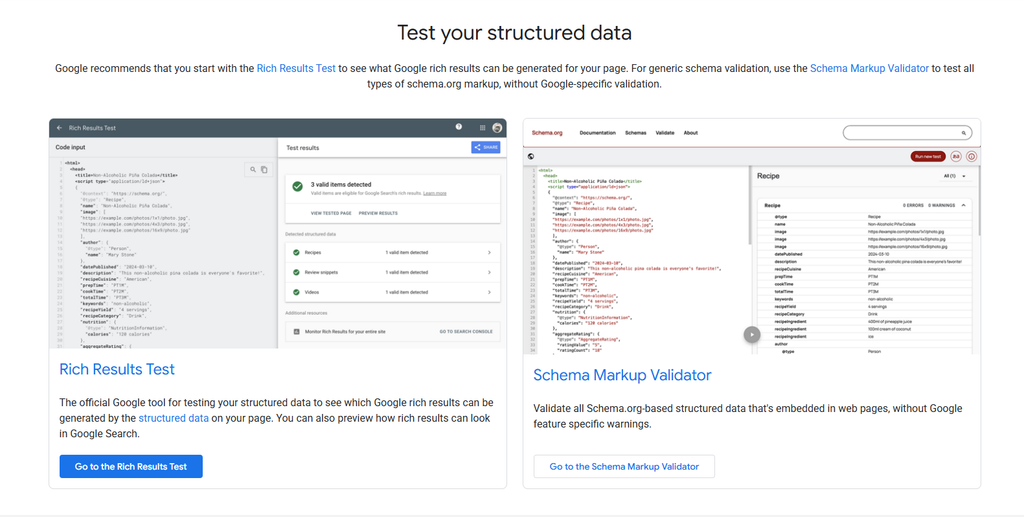
Google retired its old Structured Data Testing Tool, so the current standard is the Rich Results Test. Paste in a URL or your raw code, and it tells you whether the page is eligible for rich results and flags any errors.
If you’re auditing schema across many pages at once rather than one at a time, that’s a bigger job than a single-URL tester is built for, but for validating a page before it goes live, the Rich Results Test is the standard.
One thing worth checking alongside schema: if you’ve recently moved or renamed a page, confirm the redirect is set up correctly first. A broken or looping redirect can keep a page from being crawled at all, which means the schema on it never gets read no matter how correct the markup is. Our guide to redirect types covers exactly which redirect to use when, and you can verify any URL’s redirect chain with the free Redirect Checker.
Build Your Schema Without Writing Code
Reading about schema types is one thing. Actually generating valid, error-free JSON-LD for your specific page is the part that usually eats an afternoon.
SearchBulb’s free Schema Markup Generator covers all 18 of the types in this guide. Fill in a plain-English form, and it builds clean, correctly formatted JSON-LD in real time, no account, no limits, and nothing to install.